
WINDOWS SECURITY HARDENING
Check how securely Windows 11 is configured

Windows 11 gives you security capabilities. Your configuration determines how effectively you use them. Review the protections on your actual devices, identify avoidable exposure and build a practical hardening plan with SecureX7.
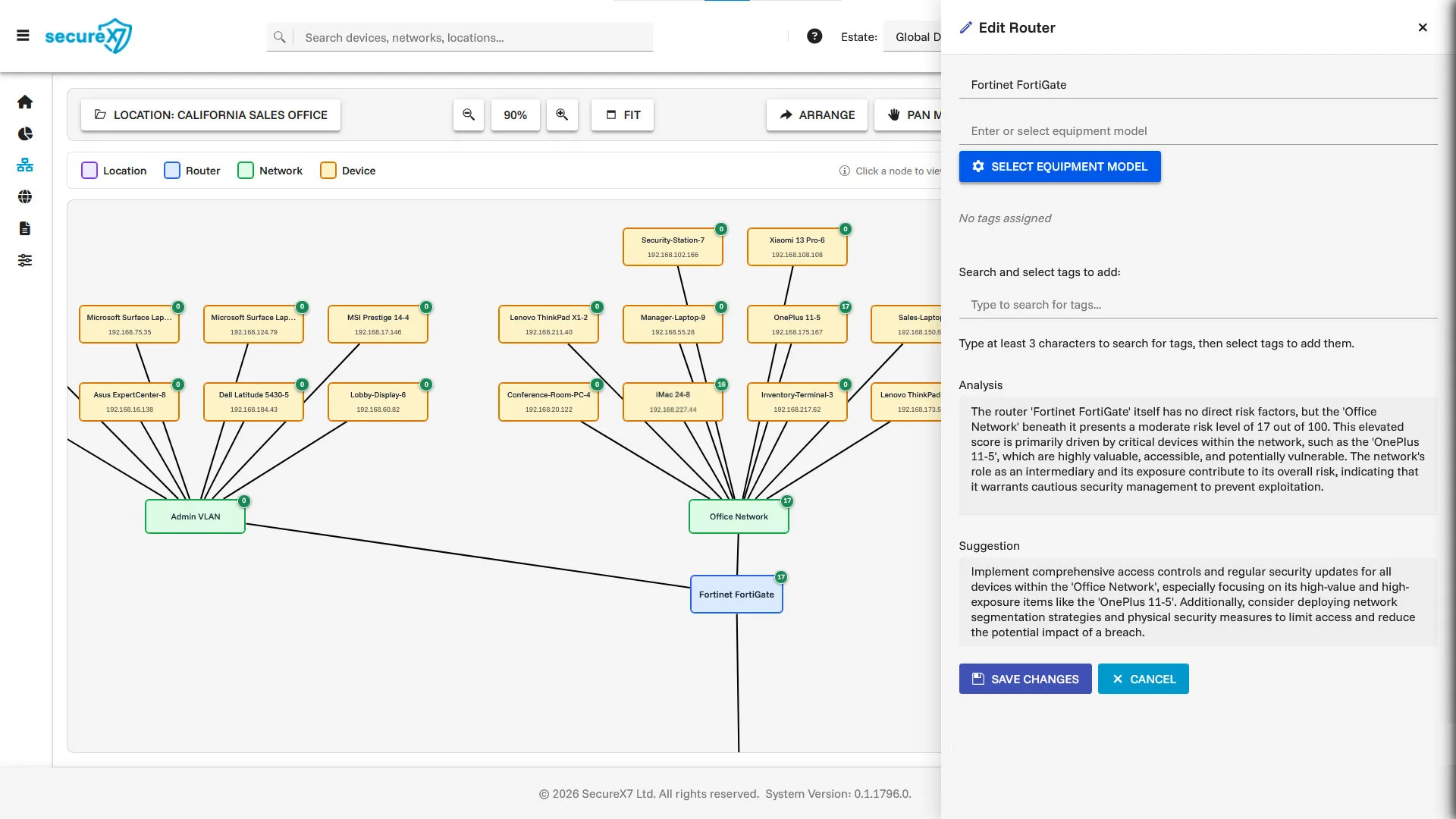
SecureX7 AI-Assisted Work Plans help you design and implement a hardened Windows build standard, using asset context, configuration assessment and actionable remediation guidance.
Start with the device you actually have
Identify the Windows edition, release, installed applications and business owner. Confirm that the operating system and key software remain within their supported lifecycle. Feature availability and management options can vary, so a setting that applies to one device may be unavailable on another.
Record whether the device is managed through a domain, cloud management or local policies. That context helps you identify which configuration source should own each setting and where a corrective change belongs.
Review the protections that matter
Check whether the host firewall is active on the relevant network profiles and whether inbound rules allow only necessary access. Review local administrators, remote access permissions and the separation between ordinary work and administration. Confirm that your chosen malware protection is active and current.
Review disk encryption and recovery arrangements, Secure Boot and hardware-backed protections where applicable. For application restrictions and attack surface reduction rules, test representative business workflows before enforcing a wider rollout. These controls can improve security, but compatibility still matters.
Apply changes in a controlled sequence
Establish an initial assessment, agree the target configuration and pilot changes on a small group of representative devices. Include the applications, peripherals and remote working patterns your users rely on. Record the change and define what successful operation looks like.
After rollout, reassess the device configuration and investigate settings that have not taken effect. Identify policy conflicts or local overrides before repeating deployment. Keep approved exceptions visible and review them when their business justification changes.
Use SecureX7 to prioritise the next action
SecureX7 helps you understand your Windows assets and assess configuration weaknesses alongside vulnerabilities. Compliance scoring gives you a view of posture, while remediation guidance explains the work needed to address findings.
Ask the embedded AI which Windows weaknesses need attention first, then use the result to focus your workplan. Prioritisation should consider how the device is used and what it can access. Reassessment helps establish whether the resulting changes improved the measured configuration.
Build a Windows 11 hardening plan with SecureX7
SecureX7 AI-Assisted Work Plans help design a Windows 11 hardened build standard around the devices and applications your business uses. Discovery and classification provide the asset context; configuration assessment and vulnerability identification highlight gaps in the current build. Use that information to decide the expected firewall settings, account permissions, required services and protection features for each role.
Ask the embedded AI to help plan a Windows 11 hardened build for your office laptops or specialist workstations. Develop the implementation sequence with pilot checks, approved exceptions and reassessment. SecureX7 remediation guidance helps your team understand the changes, while compliance scoring helps review progress against the assessed controls.
Support your security and compliance frameworks
For Windows 11, record how the approved build supports the frameworks relevant to each device group. Keep the technical configuration consistent where the requirements overlap, while retaining separate scope and assessment decisions for each programme.
| Framework | Relevant hardening reference |
|---|---|
| NIST SP 800-53 Rev 5 | CM-6 Configuration management |
| NIST SP 800-171 Rev 3 | 03.04.02 Configuration management |
| PCI DSS v4.0.1 | Requirement 2 Secure configurations |
| Cyber Essentials | Secure configuration and related Windows controls |
| ISO 27K | ISO/IEC 27001 and 27002 Configuration management |
These references indicate where Windows hardening work is relevant. Confirm the applicable scope and framework revision; configuration checks contribute to assurance alongside the wider organisational requirements.
Frequently asked questions
Is Windows 11 secure by default
Built-in protections provide a foundation, but you still need to review settings, accounts, applications and access for your business use.
Should every device use identical settings
Use a consistent core baseline and documented variations for legitimate device roles. Avoid unexplained differences between otherwise similar devices.
How do AI Assisted Work Plans support implementation
They help your team design the hardened build standard and organise the work needed to implement it. Review the proposed changes, apply approved settings through your management process and reassess with SecureX7 to verify the resulting configuration.
ADVANCED TECHNICAL GUIDE
Which Windows services can you safely disable?
One of the most technically challenging areas of secure configuration is dealing with unnecessary services.
The principle is straightforward: reduce functionality that isn't required and you reduce the potential attack surface. In practice, it's much harder.
Cyber security guidance may tell you to disable services that aren't essential — but how do you decide what's genuinely unnecessary? And how do you make sure a service isn't actually essential to an application your business depends on?
It's no good being more secure if your systems no longer function properly. But equally, you don't want to leave unnecessary services running and your systems needlessly exposed.
This free guide takes away the guesswork.
The Windows 10 & 11 Hardened Services Guide gives you the background and a practical, step-by-step approach to assessing Windows services before making changes.
- Discover which services are running
- Understand their function and dependencies
- Identify services that should always be retained
- Find role-dependent services that may still be required
- Identify candidates for safe removal
- Test changes before wider deployment
- Verify the result and maintain an auditable baseline


Take the next step
Book a SecureX7 demo to see how AI-Assisted Work Plans help you design and implement a hardened Windows build standard. Explore asset discovery, configuration analysis, vulnerability prioritisation and remediation guidance, and ask how the work can support your applicable security frameworks.