
WINDOWS SECURITY HARDENING
Give every Windows hardening task a clear outcome

A useful checklist tells you what to inspect, what action to take and how to confirm the result. Use this sequence to organise Windows hardening work, then use SecureX7 to assess weaknesses and track improvements in the device configuration.
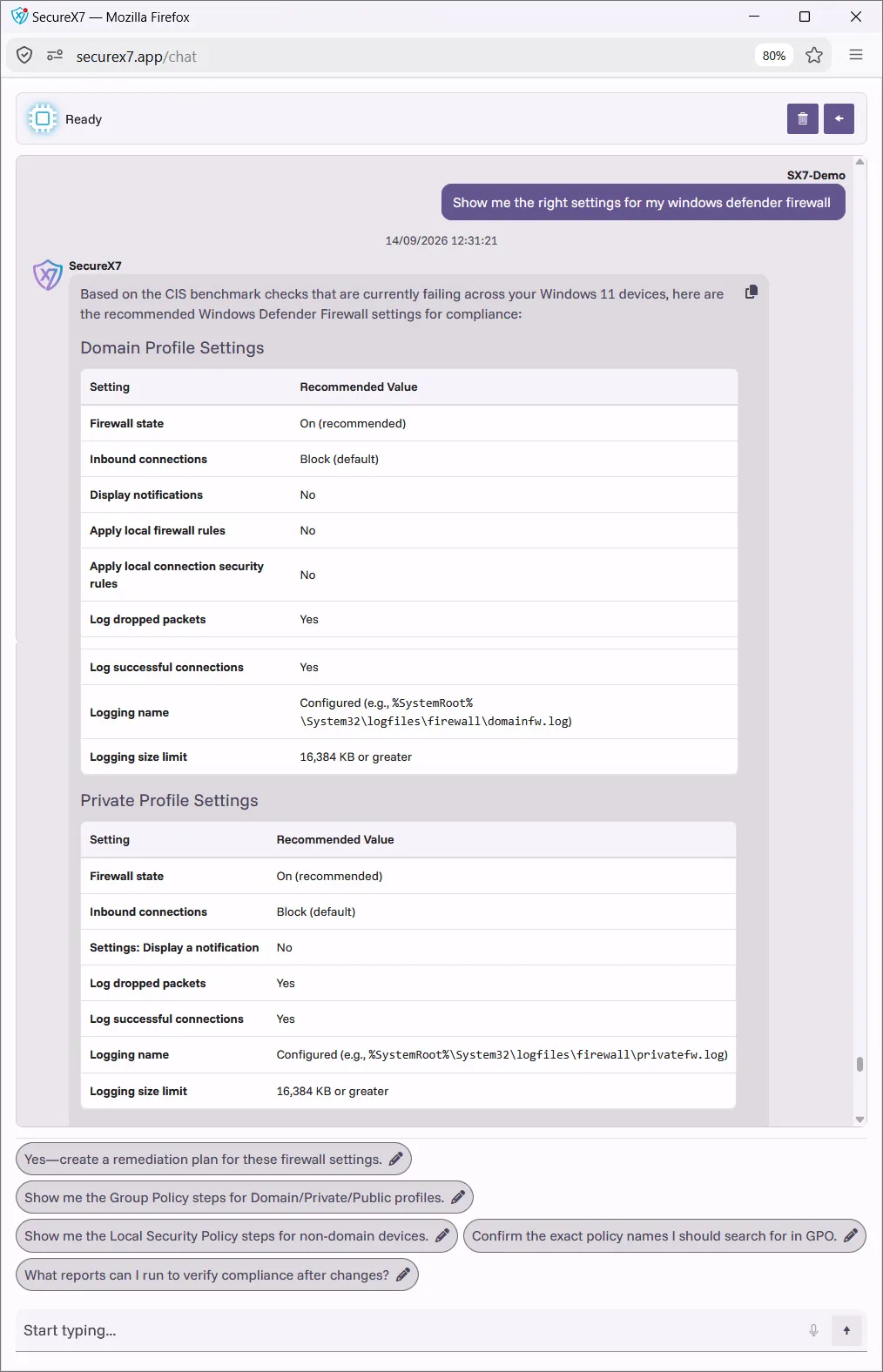
SecureX7 AI-Assisted Work Plans help you design and implement a hardened Windows build standard, using asset context, configuration assessment and actionable remediation guidance.
Establish scope and accountability
List the Windows devices in scope, including remote laptops and systems that are infrequently connected. Record their owners, operating system releases, important applications and management methods. Identify systems that are missing from your normal management view.
Choose the baseline for each device role and record its version. Confirm the change owner and who can approve an exception. This prevents a checklist becoming a collection of settings with no clear target or responsibility.
Inspect the essential controls
Confirm supported software and update arrangements. Review whether the firewall is active and unnecessary inbound rules have been removed. Check that ordinary users have the permissions they need, and investigate excessive local administrator membership.
Verify active malware protection and inspect remote access settings. Review unused applications, optional features and services against actual business needs. Check encryption and recovery arrangements where required by your policy. Record the observed configuration rather than accepting a policy document as proof.
Make each change verifiable
For each finding, record the affected device, current value, intended value, reason for change and responsible person. Include a test plan and rollback method for settings that could affect access or application behaviour.
Pilot higher-impact changes before deploying them widely. Validate business functions after the change and reassess the security setting. Close the task when the expected configuration has been observed, or record an approved exception with a review date. A deployment job completing is only one part of that check.
Repeat the checklist when the estate changes
Revisit the checklist when devices join the business, Windows is upgraded or important applications are introduced. Regular reassessment should also identify weakened settings and devices whose results are no longer current.
SecureX7 combines discovery, configuration assessment, compliance scoring and remediation guidance to help turn the review into a practical workplan. Use the checklist as the organising structure and the assessment as evidence of what needs attention. Keep the next review date visible so completed work stays relevant.
Turn the checklist into an AI Assisted Work Plan
Use SecureX7 AI-Assisted Work Plans to turn a Windows hardening checklist into a plan for designing and implementing your approved build standard. Start with discovery and configuration assessment, then use the findings to focus on the devices and settings that need work. The checklist becomes more useful when each action has a defined target and a verification step.
Ask the embedded AI to help organise the hardening work for your selected device group. In the implementation plan, include the responsible person, test dependencies, rollout sequence and evidence needed to close the task. Apply approved changes through your Windows management process and reassess with SecureX7 so the checklist reflects the resulting state.
Support your security and compliance frameworks
Add a requirement reference to the checklist where it applies. A completed technical task can then be reviewed for several assurance programmes without assuming that the programmes have identical scope or assessment criteria.
| Framework | Relevant hardening reference |
|---|---|
| NIST SP 800-53 Rev 5 | CM-2 and CM-6 Configuration management |
| NIST SP 800-171 Rev 3 | 03.04.01 and 03.04.02 Configuration management |
| PCI DSS v4.0.1 | Requirement 2 Secure configurations |
| Cyber Essentials | Secure configuration and related Windows controls |
| ISO 27K | ISO/IEC 27001 and 27002 Configuration management |
These references indicate where Windows hardening work is relevant. Confirm the applicable scope and framework revision; configuration checks contribute to assurance alongside the wider organisational requirements.
Windows Security Hardening FAQs
No. It supports Windows configuration work; certification considers all applicable requirements across the agreed scope.

Take the next step
Book a SecureX7 demo to see how AI-Assisted Work Plans help you design and implement a hardened Windows build standard. Explore asset discovery, configuration analysis, vulnerability prioritisation and remediation guidance, and ask how the work can support your applicable security frameworks.
Related Windows hardening guidance
- Windows Security Hardening
- Windows 11 Security Hardening
- Windows Security Baselines
- Auditing Windows Security Configuration
- Windows Hardening for Cyber Essentials