
CYBER ESSENTIALS
Cyber Essentials and Firewalls

Protect every connection. Control every exposure.
Firewalls are one of the five fundamental Cyber Essentials technical controls, providing an essential defence against unauthorised network access.
Their purpose is straightforward: prevent unwanted connections from reaching your devices and services while allowing legitimate business communications to continue.
However, firewall security is not simply about installing a network appliance or enabling Windows Defender Firewall. It requires appropriate rules, secure administration, justified exceptions and consistent protection wherever devices are used.
A laptop connecting from home, a server hosted in the cloud and an office computer behind a business router may all require different firewall arrangements.
Cyber Essentials expects organisations to understand these environments and ensure that appropriate protections are in place.
SecureX7 helps assess supported endpoint firewall configurations, identify disabled protection and highlight security weaknesses that could undermine Cyber Essentials compliance.
Its AI-powered actionable guidance explains identified configuration problems and recommends practical corrective actions.
Know which devices are protected. Understand which connections are permitted. Identify unnecessary exposure.
What Cyber Essentials Expects
Appropriate firewall protection for every in-scope device
Cyber Essentials requires in-scope devices to be protected against unauthorised connections from the internet through appropriately configured firewalls.
These may be network firewalls, host-based software firewalls or a combination of both.
The essential requirements include:
- Block unsolicited inbound connections by default, allowing only those explicitly required for legitimate business purposes.
- Document and justify inbound firewall exceptions, ensuring rules are authorised and unnecessary access is removed.
- Secure firewall administration, changing default credentials and restricting access to authorised administrators.
- Protect administrative interfaces, preventing unnecessary exposure to the internet.
- Maintain supported firewall software and firmware, applying relevant security fixes within the required timescales.
- Protect devices outside the office, including laptops connecting through home networks, public Wi-Fi and other external locations.
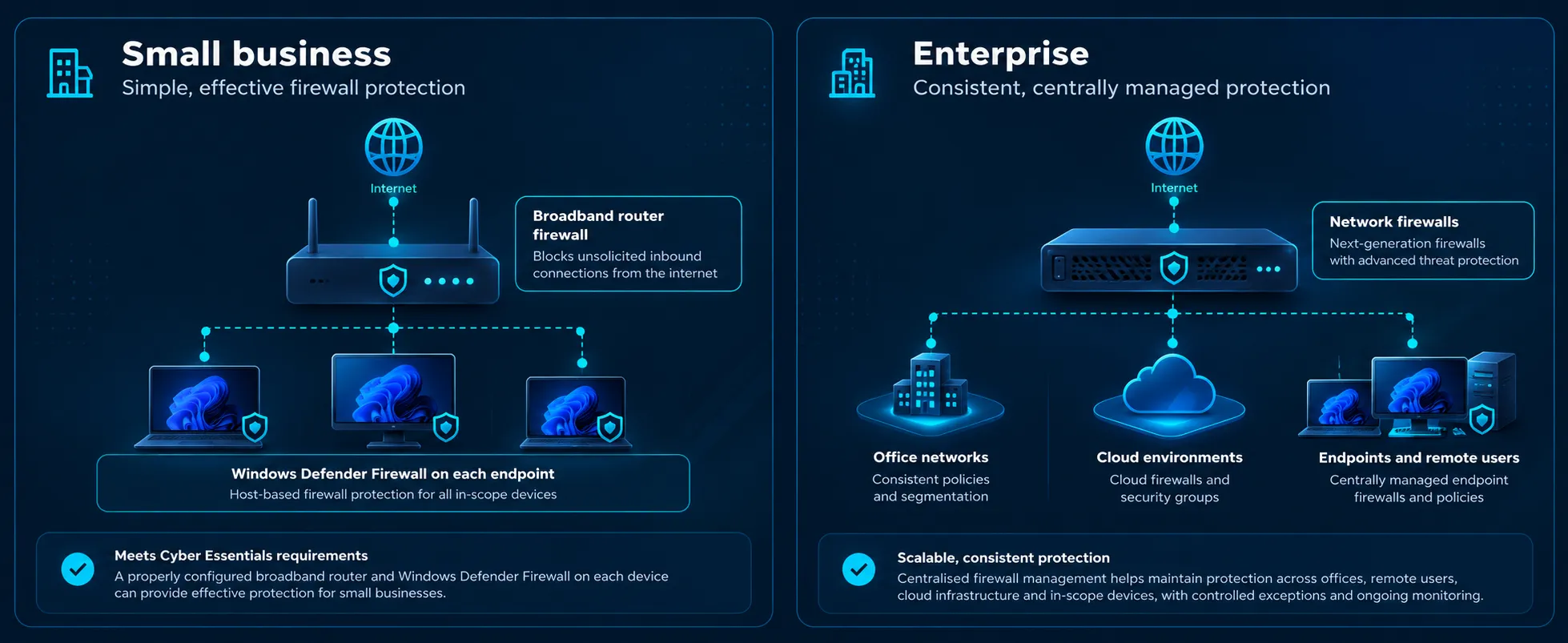
For small businesses
A small business may not need an expensive enterprise firewall.
A properly configured broadband router can provide network-level protection, while Microsoft Defender Firewall, included with Windows 10 and 11, provides host-based protection for individual computers.
The important considerations are ensuring firewall protection remains enabled, unnecessary inbound rules are removed and users cannot routinely weaken security settings.
For enterprise organisations
Larger organisations may use dedicated next-generation firewalls, centrally managed endpoint firewalls, cloud firewalls and network segmentation.
The challenge becomes maintaining consistent policies across offices, remote users, cloud infrastructure and different network environments.
Enterprise security teams should establish approved firewall baselines, centrally manage exceptions, monitor changes and periodically review rules for unnecessary exposure.
SecureX7 helps verify supported endpoint firewall configurations against established security requirements, highlighting deviations and providing actionable remediation guidance.
Common Firewall Problems
Small configuration changes can create significant security weaknesses
Firewall problems frequently arise not because protection is absent, but because configurations change and exceptions accumulate.
Disabled endpoint firewalls
Firewalls may be temporarily disabled during troubleshooting and never re-enabled, leaving devices exposed when connected to less trusted networks.
Unnecessary inbound rules
Applications and administrators can introduce firewall exceptions that remain long after the original business requirement has disappeared.
Exposed remote administration
Remote Desktop, management services and administrative interfaces can become accessible from untrusted networks without appropriate restrictions.
Overly permissive firewall policies
Broad rules allowing unnecessary ports, protocols or source addresses can undermine the protection provided by an otherwise capable firewall.
Unmanaged remote devices
Laptops used outside the corporate network may lack effective host-based firewall protection, particularly when connected to home or public networks.
Outdated firewall firmware
Network appliances running unsupported or vulnerable firmware can themselves become targets for attackers.
SecureX7 helps organisations identify supported endpoint firewall configuration weaknesses, including disabled protection and inappropriate settings.
By combining configuration assessment with asset visibility and AI-powered remediation guidance, SecureX7 helps teams understand which devices require attention and what corrective action should be considered.
A firewall is only as effective as the rules it enforces — and the security of the systems it protects.
Related Controls
Firewalls work best as part of a coordinated security strategy
Firewall protection is closely connected to the other four Cyber Essentials technical controls. Together, they provide complementary layers of defence against common cyber threats.
Secure Configuration
Unnecessary network services, exposed administrative interfaces and insecure default settings can create vulnerabilities that firewall rules alone cannot eliminate.
Security Update Management
Firewalls, operating systems and network services must remain supported and receive relevant security fixes. Outdated firmware and vulnerable applications can undermine otherwise effective network protection.
User Access Control
Restricting administrative privileges and securing administrator authentication reduces the risk of unauthorised firewall configuration changes.
Malware Protection
Firewalls help restrict unwanted network connections, while malware protection helps prevent malicious software from executing on endpoints. Both are important components of effective defence.
Additional Firewall Guides
Microsoft Defender Firewall and Cyber Essentials
Learn how to configure Windows Defender Firewall, assess inbound rules and verify protection across Windows endpoints.
Cyber Essentials Firewall Rules Explained
Understand inbound connections, business-justified exceptions and common configuration mistakes.
Firewalls for Remote Workers
Explore how host-based firewalls protect laptops and other devices when operating outside the corporate network.
SecureX7 brings these disciplines together through automated asset discovery, security configuration assessment, vulnerability identification and AI-powered actionable remediation guidance.
Discover. Assess. Prioritise. Remediate. Verify.
Are Your Firewalls Configured Correctly?
SecureX7 helps identify endpoint firewall weaknesses, assess your Cyber Essentials security posture and understand what needs fixing.