
CYBER ESSENTIALS
Cyber Essentials Scope
You can't secure what you don't know you have. Start by understanding your environment.

You can't secure what you don't know you have. Start by understanding your environment.
One of the first steps towards Cyber Essentials certification is establishing which devices, networks, systems and cloud services are included in your assessment.
This is known as your Cyber Essentials assessment scope.
Defining scope correctly is essential. Excluding systems that should be included can undermine your assessment, while overlooking devices or cloud services can leave security weaknesses unidentified.
For organisations with multiple locations, remote workers, cloud applications or a mixture of company-owned and personal devices, determining the correct scope can be challenging.
SecureX7 helps you understand your environment before you begin. Automated asset discovery and software inventory provide greater visibility of supported devices and applications, helping you identify potential gaps in your asset records and prepare for scope discussions.
Before you can demonstrate that your environment is secure, you need to know what's in it.
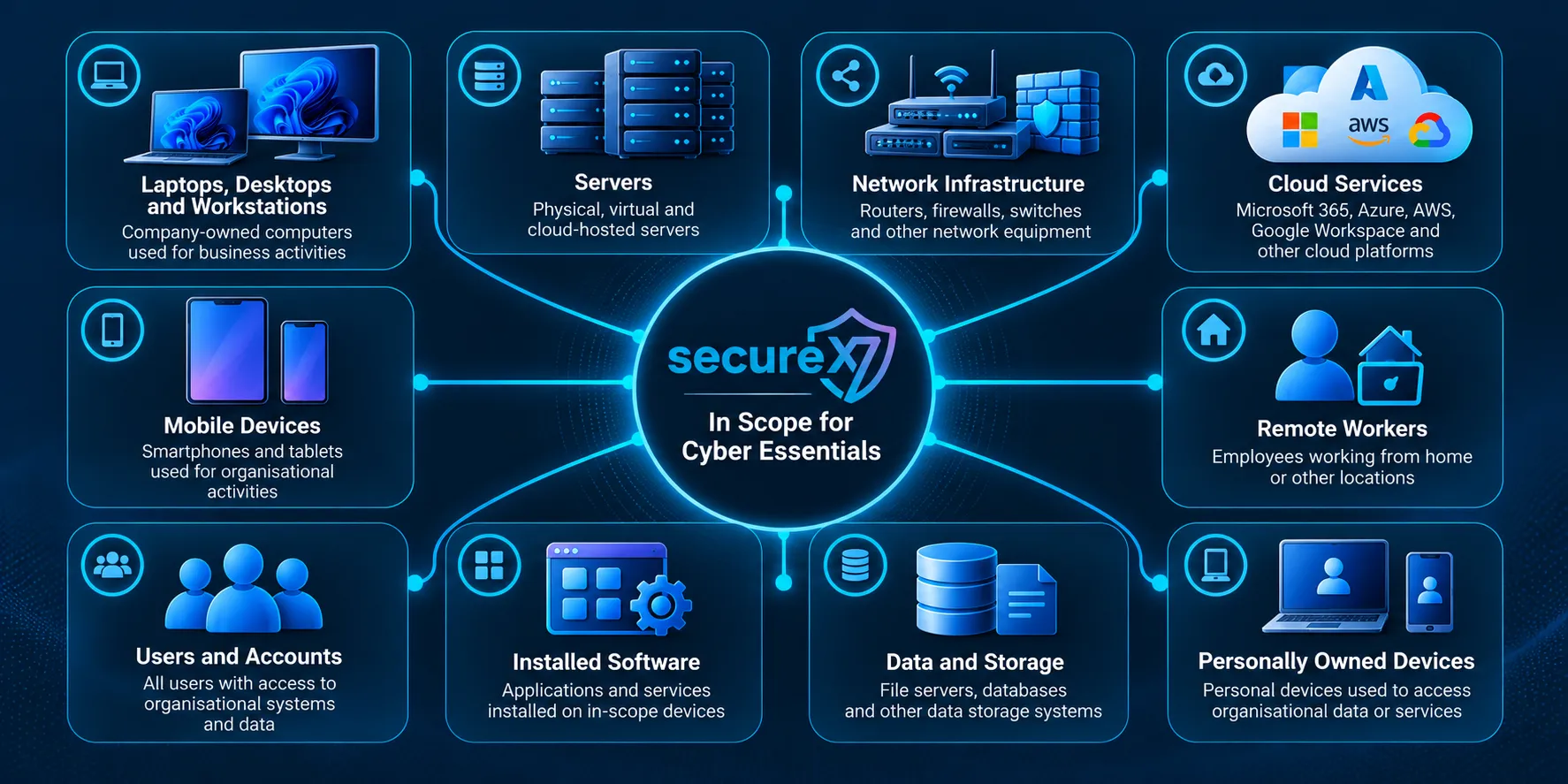
Understanding Your Scope
Which devices and services need to be included?
Cyber Essentials assesses the technical controls protecting an organisation's in-scope IT infrastructure.
The exact scope depends on how your organisation operates, which systems it uses and how those systems connect to organisational data and services.
Laptops, Desktops and Workstations
Company-owned computers used for business activities are generally relevant to the assessment.
This includes Windows, macOS and Linux devices, whether they are located in an office or used remotely.
Devices must be appropriately protected through secure configuration, supported software, security updates, access controls and malware protection.
Servers and Network Infrastructure
Servers, routers, firewalls and other network infrastructure may be included where they support or protect the assessed environment.
This includes physical infrastructure and relevant virtualised systems.
Cloud Services
Cloud services are an important part of Cyber Essentials scope.
Organisations using Microsoft 365, Azure, AWS, Google Workspace or other cloud platforms must consider the applicable cloud services and the security responsibilities they retain.
Using a cloud provider does not automatically remove a service from scope.
Remote Workers
Employees working from home or other locations still use devices and services that may fall within the organisation's assessment scope.
Their location does not, by itself, exclude those systems from Cyber Essentials requirements.
Personally Owned Devices
Personal devices used to access organisational data or services may be relevant to scope.
Organisations should review their bring-your-own-device arrangements and determine how the applicable Cyber Essentials controls are satisfied.
Mobile Devices
Smartphones and tablets used for organisational purposes may also be in scope.
These devices require appropriate consideration of supported operating systems, security updates, access controls and other relevant technical requirements.
The important question is not simply who owns a device or where it is located, but how it is used and whether it falls within the scheme's scoping requirements.
Scope Checklist
A practical starting point for defining your Cyber Essentials assessment.
Use the following checklist to review your environment before submitting your assessment.
| Assessment Area | Questions to Ask |
|---|---|
| Business locations | Have you identified all offices, sites and locations relevant to the assessment? |
| Laptops and desktops | Do you have an accurate inventory of business computers, including remote devices? |
| Servers | Have you identified relevant physical, virtual and cloud-hosted servers? |
| Operating systems | Are all in-scope operating systems supported and receiving security updates? |
| Installed software | Do you know which applications are installed and whether they remain supported? |
| Network infrastructure | Have you identified relevant routers, firewalls and other network equipment? |
| Cloud services | Have you reviewed the cloud platforms and applications used by the organisation? |
| Remote working | Have you considered devices and services used by remote employees? |
| Personal devices | Have you reviewed personal devices used to access organisational data or services? |
| Mobile devices | Have you considered smartphones and tablets used for organisational activities? |
| Network boundaries | Are any proposed exclusions supported by appropriate technical separation and the scheme's scoping rules? |
| Third-party services | Have you identified relevant outsourced services and clarified responsibility for their security controls? |
Common Scope Mistakes
Several mistakes can cause organisations to underestimate their Cyber Essentials responsibilities.
Assuming home workers are excluded
Remote devices may remain in scope even when they operate outside the office.
Forgetting cloud services
Microsoft 365 and other cloud services must be considered when defining the assessment scope.
Relying on incomplete asset inventories
Devices that are not recorded in an inventory can easily be overlooked during preparation.
Assuming personal devices are automatically excluded
Ownership alone does not determine whether a device is relevant to the assessment.
Excluding systems without appropriate separation
A proposed exclusion must satisfy the scheme's requirements. Simply describing a system as separate or out of scope is insufficient.
SecureX7 helps reduce uncertainty by providing greater visibility of supported assets and software, allowing administrators to investigate potential omissions before the assessment begins.
Next Steps
Turn your asset inventory into a practical Cyber Essentials preparation plan.
Once you understand your proposed scope, the next step is to assess whether the relevant systems satisfy the Cyber Essentials technical controls.
A practical preparation process involves four activities.
1. Confirm Your Assessment Scope
Review the devices, networks and cloud services that should be included.
Where exclusions are proposed, ensure they are justified under the current Cyber Essentials requirements and accurately documented.
2. Assess the Technical Controls
Review the five Cyber Essentials control areas across the relevant environment.
Look for unsupported software, missing security updates, insecure configurations, excessive privileges and weaknesses in firewall or malware protection.
3. Create a Remediation Workplan
Prioritise identified weaknesses and establish the corrective actions needed before assessment.
SecureX7's AI-assisted workplans help turn technical findings into practical remediation activities, with guidance designed to help administrators understand what needs changing.
4. Verify Your Readiness
Reassess devices after remediation and review any outstanding issues.
Remember that an accurate technical assessment is an important part of preparation, but it does not replace the formal Cyber Essentials questionnaire or the Certification Body's assessment.
How SecureX7 Helps
SecureX7 brings together asset discovery, software inventory, security configuration assessment, vulnerability identification and AI-assisted remediation guidance.
Instead of relying entirely on spreadsheets and manual device checks, organisations can use SecureX7 to build a clearer picture of their environment and identify weaknesses requiring attention.
Know what's in scope. Understand what's at risk. Fix what matters.
Discover Your Environment with SecureX7
Start your free trial and see how SecureX7 helps simplify Cyber Essentials preparation.